How Can We Help?
Downloading and viewing attachments
Viewing attachments on mobile
Popups need to be enabled for myclinic365.com
Instructions
iPhone: How To Allow Pop-Ups on iPhone: Safari, Chrome & All Browsers (2026) – DevX
https://www.devx.com/how-tos/how-to-allow-pop-ups-on-iphone/
Android: How to Enable Pop-Ups on Android – TechCult
https://techcult.com/how-to-enable-pop-ups-on-android/
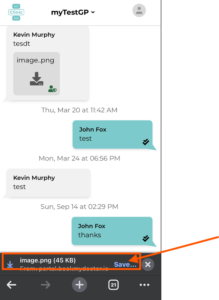
Download and Save attachment
When you click on the attachment (once popups have been enabled) it will be shown at the bottom of the screen with the option to save. Click on save and save it to your preferred location. Once saved you can view and share as needed.